

Questions about the app
In our FAQ section, you will find short and clear answers to everything you need to know about the Berlin WelcomeCard and the app. From loading and using your digital tickets to redeeming discounts. This means you always have all the information you need at your fingertips and can relax and enjoy planning your stay in Berlin.
Questions about using the app
The Berlin WelcomeCard app is available for free download from the App Store (iOS) and Google Play Store (Android).
The app works without a user account or registration. However, you can use the profile feature to manage your interests locally within the app.
Yes, once downloaded, the information is also available offline. However, map content and current updates require an internet connection.
The app is available in German and English. You can change the language under the "Profile" menu by selecting "Language".
After purchasing your ticket in the app, it will be saved there automatically. If you purchased your ticket via the website, you can easily import it into the app. You can then conveniently show your digital ticket on your smartphone, both on public transport and at all participating partners.
Tickets purchased online, for example via www.berlin-welcomecard.de or www.visitberlin.de, can be uploaded as digital tickets into the app.
1. Go to the “Tickets” tab:

2. Click on “Import purchased ticket”:
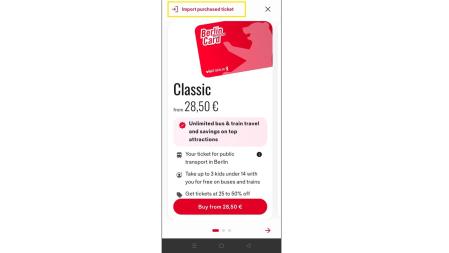
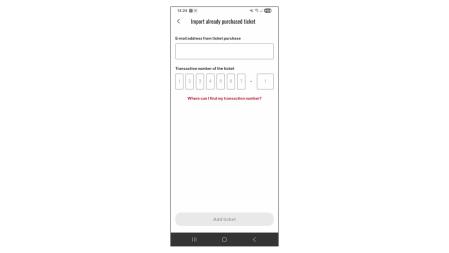
3. Then enter the exact email address used to book the ticket, as well as your transaction number. Next, click the “Add ticket” button to upload your ticket. The last field can contain a double digit number if your ticket was purchased in a group booking.
4. The transaction number can be found below the barcode on your ticket.
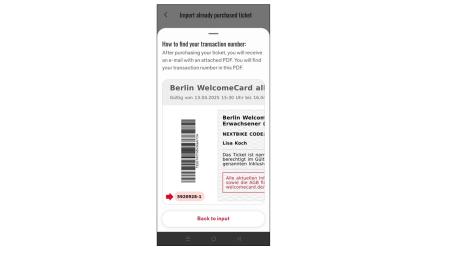
5. For additional tickets, repeat this process accordingly. When several tickets are booked, the last digit of the transaction number changes, for example -1, -2, -3, etc.
Exceptions:
1. Paper tickets:
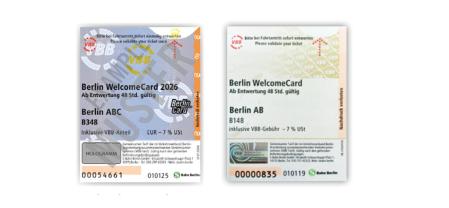
Paper-tickets issued by transport providers, for example those purchased at ticket machines or at Berlin Tourist Information centers, cannot be uploaded as digital tickets into the app. These tickets must be carried in their original paper form.
Example image:
2. App tickets by other providers:
Berlin WelcomeCards that were purchased as digital tickets via another provider’s app (e.g. BVG apps such as “Fahrinfo,” “Tickets,” or “Jelbi,” or the GetYourGuide app) cannot be transferred to the Berlin WelcomeCard app.
Yes, multiple tickets can be uploaded. Please make sure to use the correct transaction number, as each ticket has its own individual number.
If you have a problem or feedback about the Berlin WelcomeCard app, please send us an email at bwc-app [at] visitberlin.de.
Frequently asked questions about the Berlin WelcomeCard (Classic)
Use and validity
1. You can buy the Berlin WelcomeCard online, in the Berlin WelcomeCard App or at any of our many sales outlets.
2. Validate the public transport ticket before your first journey on the public transport system in Berlin. You can find ticket validation machines on tube and city railway platforms or in the buses and trams. And remember – only validate your ticket once. Your Berlin WelcomeCard and public transport ticket is now valid for the specified validity period indicated on the ticket. Online tickets (print@home) do not need to be validated and are valid from the time indicated on the ticket.
3. Online tickets must either be printed out in A4 format and carried with you, or uploaded digitally to the Berlin WelcomeCard App.
4. To benefit from the discounts on attractions and services, you must always show your ticket to each discount partner before using the discounted services. Check the Berlin WelcomeCard app or the partner's page to see how the discount is redeemed.
The AB fare zone covers Berlin’s urban area.
The ABC fare zone covers not only the city of Berlin but also Potsdam and Airport Berlin Brandenburg (BER). To get from and to the airport, you may use the S-Bahn, busses, as well as the FEX (Airport Express) train operated by Deutsche Bahn and all regional trains (RB/RE) stopping at the Airport. The Airport is in fare zone C, so make sure you have Berlin WelcomeCard variant that covers fare zone C.
Unfortunately not. You cannot extend the Berlin WelcomeCard AB fare zone by adding a single connection ticket for the C fare zone. If you are flying into Airport Berlin Brandenburg BER or planning to visit Potsdam, we recommend the ABC ticket.
The 48-hour and 72-hour tickets are valid for exactly 48 hours or 72 hours. For hardtickets, the ticket is valid from the moment of validation. Online tickets (48 h / 72 h variant) are valid from the selected validity day and time.
Example: You have opted for the 48-hour Berlin WelcomeCard. You validate the ticket when you first travel on public transport on Saturday at 9:30 am. The Berlin WelcomeCard and public transport ticket is then valid until 9:29 am on Monday.
The 4, 5 & 6 day variant is valid from the first calendar day of use (for hardtickets) or from the calendar day indicated on the ticket (for online tickets) until midnight of the last calendar day.
Example: You have opted for a 4-day Berlin WelcomeCard. If you validate the ticket at any time on Tuesday, the Berlin WelcomeCard and public transport ticket is then valid until midnight on Friday.
To benefit from the discounts on attractions and services, you must show the valid ticket to each discount partner before using the discounted services.
Group, child and other discounts
No, the Berlin WelcomeCard is valid for one adult.
For all variations of the Berlin WelcomeCard, you can be accompanied by any number of children under 6 years old on public transport for free.
For all variations, the adult card holder can also be accompanied by up to 3 children from age 6 up to and including 14 years old on public transport for free.
Children aged 15 and over need their own ticket.
Unfortunately not. The Berlin WelcomeCard is specially designed to include discounts. No other reductions (e.g. for senior citizens or students) are offered.
Buying options
Online:
In Berlin
- in the Berlin Tourist Info Centres
- in many Berlin hotels and in retail outlets
- at sales points and public transport ticket machines (BVG and S-Bahn Berlin).
- in the BVG buses
- Hardtickets: available for AB and ABC fare zones
This is the ticket you can buy in Berlin (at the Tourist Info Centres, hotels, retail outlets and public transport (BVG and S-Bahn) sales points and ticket machines). Before using puplic transport, Hardtickets must be validated (stamped) just once. - Online Ticket (also called print@home-ticket): available for AB and ABC fare zones
After the booking process is completed, the ticket is sent to the email address you entered. You can then print the ticket out. The ticket is valid from the printed time. It does not need to be validated. - App ticket: Tickets purchased via the Berlin WelcomeCard app are stored digitally within the app and do not need to be printed. Print@Home tickets can also be loaded into the app after purchase.
Booking / Payment / Cancellation
- First day of use; for 48-hour and 72-hour tickets, first day of use and time of validation
- Ticket holder’s first and last name
- Email address for confirmation email
- Postal address
- Details of preferred payment option
- /node/1793Credit card (Mastercard, VISA, Amex)
- Paypal
- GooglePay
Unfortunately not. The tickets can neither be cancelled or refunded. It is also not possible to exchange the ticket for one valid for a longer or a shorter time. You can find all the details in our terms and conditions.
If you have any questions about your booking, please contact our Service Center at reservierung [at] visitberlin.de.
You are already in Berlin and have a problem with your Berlin WelcomeCard? Then please contact the staff at one of the Berlin Tourist Information offices.
The delivery of online tickets for the Berlin WelcomeCard by e-mail can take up to 30 minutes. Please also check your spam folder. If you still have not received your tickets, please contact our colleagues at the Berlin Service Center at reservierung [at] visitBerlin.de or contact the Berlin Tourist Information on site. We also recommend that you order a maximum of 25 tickets per booking.
Step 1:
After you have selected your desired Print@Home ticket in the ticket configurator and placed it in the shopping cart, you can check all ticket details again in step 1 in your shopping cart.
Step 2:
In step 2, enter your billing details. Please make sure that you enter your e-mail address correctly. This is important because your tickets can only be sent to you if you enter the correct e-mail address.
Under "Important participant documents" you specify a ticket holder for each Berlin WelcomeCard.
You can then select your desired payment method and complete the order.
Step 3:
After completing the payment, you will land on an order confirmation page in step 3. Here you will see a summary of your order. You will see your booking number and you have the option to download your booking confirmation as a PDF file. You will also receive the booking confirmation with your tickets by e-mail.
Please note: In case of high booking volume, it may take up to 30 minutes for your booking confirmation to be generated by the system and for you to receive it by email. Please also check your spam folder. The sender of your booking confirmation is reservierung [at] visitberlin.de.
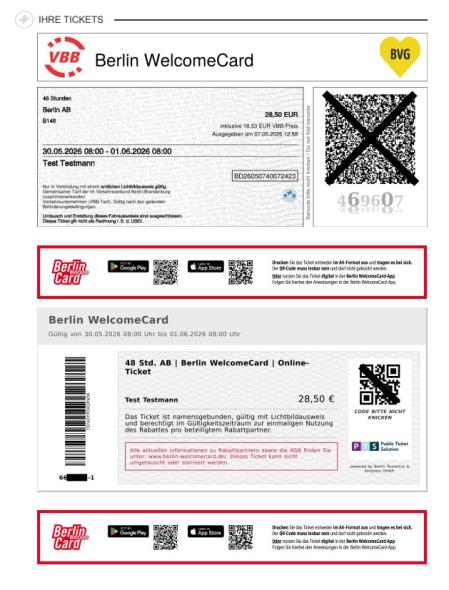
The booking confirmation contains an overview of your booked tickets on page 1. On the subsequent pages you will find your tickets. Please print out your Berlin WelcomeCard on A4 size paper or upload it digitally into the Berlin WelcomeCard App.
This is what the Print@Home ticket of the Berlin WelcomeCard looks like (sample):
Frequently asked questions about the Berlin WelcomeCard all inclusive
With the Berlin WelcomeCard all inclusive, you get free admission to numerous attractions, museums, sightseeing trips, and tours, e.g. the hop-on hop-off bus tour.
The optionally bookable ticket for the Berlin ABC tariff area allows you to travel freely by public transport.
We recommend that you download the Berlin WelcomeCard app to go with your Berlin WelcomeCard all inclusive. The app offers plenty of tips, tours, and information about all our partners.
- With your Berlin WelcomeCard all inclusive-ticket you get free entry or free use at Berlin's most popular attractions. Please print the ticket in A4 format - or import it into the Berlin WelcomeCard app digitally - and show the ticket for scanning at the partners.
- The card is only valid for the named holder with valid ID. The tickets are valid from the time indicated on the ticket.
- You must always show your Berlin WelcomeCard all inclusive to each discount partner before using the discounted services. Where attractions are included, the barcode is scanned. You can only visit each of the attractions once during the period your card is valid. A repeat entry is not allowed.
- With the Berlin WelcomeCard all inclusive- variant including public transportation, the ticket does not need to be additionally validated. The ticket is valid from the time indicated on the ticket.
If the scannable codes on the card do not work, contact a member of our team in the Berlin Tourist Info Centres.
The Berlin WelcomeCard all inclusive entitles you to free entry to the participating inclusive partners. Your card will be scanned on site, and if it is valid you will be given an entrance ticket.
You can get the Berlin WelcomeCard all inclusive in the Online Shop as an online ticket or Print@Home ticket or in the Berlin Tourist Information.
All current information about the Berlin Tourist Infos can be found here.
The tariff area Berlin ABC covers the whole city of Berlin up to the city limits as well as wider Berlin in a ring of approx. 10 - 15km. The city of Potsdam and Airport Berlin Brandenburg BER are also covered. You can use the FEX (Airport Express) train operated by Deutsche Bahn with the Berlin WelcomeCard all inclusive with public transport pass. All areas and stops covered by the tariff area can be seen in the Line network plan for the transport network of Berlin Brandenburg (VBB).
The Berlin WelcomeCard all inclusive is name-bound. When booking, you have to decide on a variant / duration (48h, 72h, 4, 5, 6 days) and an arrival date must be selected. For the 48h and 72h variants, a time must additionally be selected. The variants 4, 5 and 6 days are each valid for the entire calendar day. During the selected validity period, the ticket entitles you to a one-time use of the respective inclusive service or discount per participating service provider.
Children aged 3-14 years require a Berlin WelcomeCard all inclusive for children. Youths aged 15 and over require a Berlin WelcomeCard all inclusive for adults. The Berlin WelcomeCard all inclusive for children does not include a separate public transport ticket. Up to three children aged 14 and under can travel free of charge with a holder of an adult WelcomeCard all inclusive including transport.